ThinkPad T450s Noisy Fan and Thermal Paste
The fan on my main laptop, a ThinkPad T450s, can get pretty noisy at times, especially when watching videos or doing a Zoom call. The CPU temperatures climb up pretty high at the same time, so the fan is trying to do its job. But lately the noise and fan speed were getting annoying. On a Zoom call, the fan was always on high speed and very noisy. I started to wonder if the heat sink/fan assembly wasn’t doing its job well enough.
I found a hint in this post on a Lenovo forum, where a T450s owner discovered that there was thermal paste on only one of the two chips under the heat sink. So yesterday I took apart my T450s and discovered the same thing. I’m going to assume that smaller of the two chips, the one without thermal paste, was the GPU, not the CPU, but I don’t know for sure.
In any case, I wiped the old thermal paste off of the heat sink and the one chip that had some paste, and applied some Arctic MX-6 to both chips. The result so far seems encouraging. On a Zoom call later in the day, the fan stayed on the lower, quieter speed almost the whole time, and sped up briefly only once that I noticed.
This makes me wonder why Lenovo didn’t apply thermal paste to both chips. It seems like a serious manufacturing error.
For reference, here is an image from the Hardware Maintenance Manual for the T450s, showing the fan assembly:
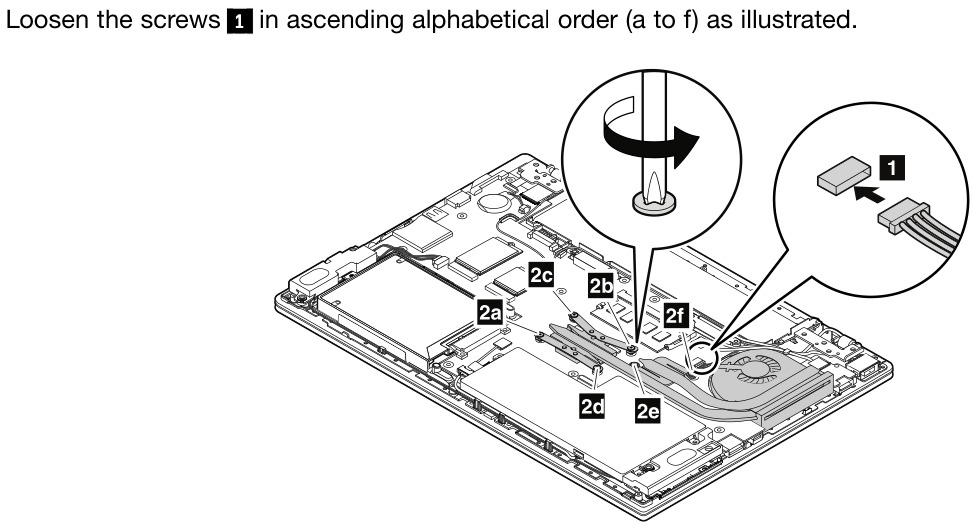
The instructions tell you to remove the screws 2a through 2f in order. On my system, only screws 2a through 2d were present, but I removed them in that order, and reinstalled them in the reverse order. Thankfully, the screws are captive, so they don’t fall out when loosened all the way.